

Activating SmartOne: step-by-step plan and costs (2026)

Written by Mr. Pro
Practical IPTV explanation from Pro-IPTV. Last checked: September 8, 2026.
My cousin called me last week. He found the SmartOne app on his new Samsung TV, saw “activate your device” and asked: “I didn’t buy anything, why do I have to pay?”
I understand. We see this confusion in our messages every week. Everyone Googles “Activate SmartOne” and mainly gets half-hearted forum answers from people who don’t understand it themselves. That’s why this one overview: how it works, what it costs and how you can arrange it without it becoming a three-day project.
First: what are you actually activating?
There are two separate things in “Activate SmartOne”:
- The app itself — the player running on your TV. Install for free from the Samsung Smart Hub or the LG Content Store.
- You subscription — the channels that appear in that app. These come from your IPTV provider. So with us.
The app is a toaster: a handy device, but you also need power. The channels are the flow. The great thing about SmartOne is that you connect the two with one simple action: through you MAC address.
Why MAC address and not M3U?
With the old Smart IPTV app you got a meter long M3U link that you had to copy, paste and hope you didn’t miss a letter. One space too many and your playlist was simply gone. Anyone who has ever spent an hour messing around with such a link on a TV remote control knows how horrifying it is.
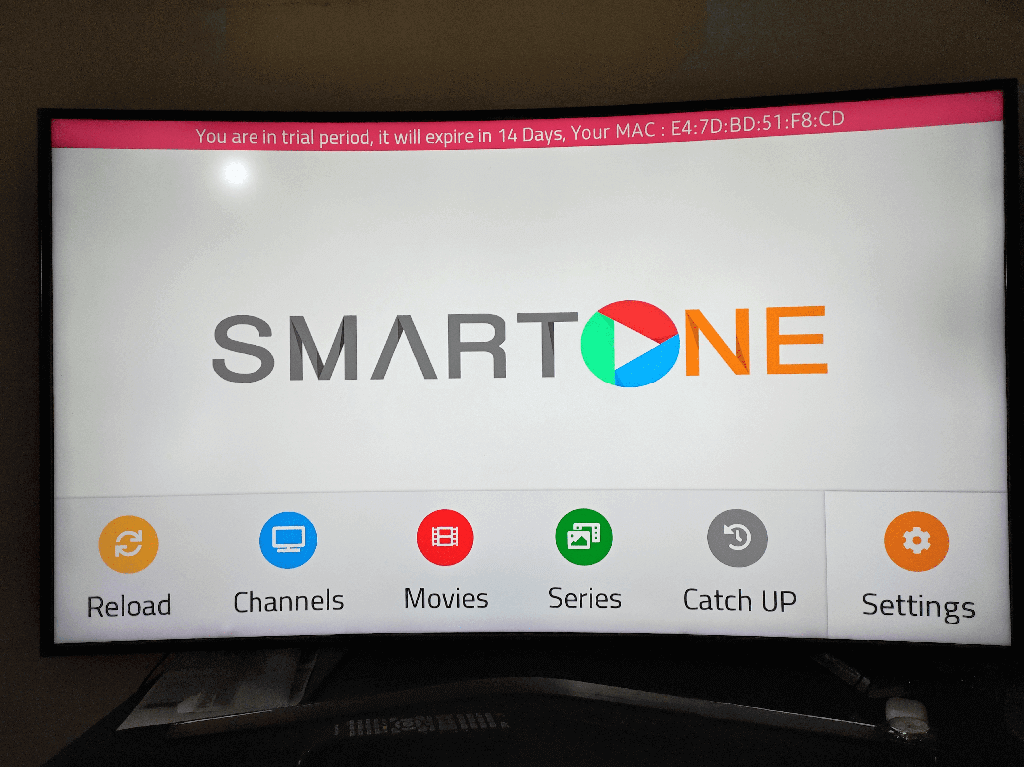
SmartOne does it differently. Your TV shows a short code in the app, something like 00:1A:2B:3C:4D:5E. That is your MAC address. You send that to your provider and they will take care of the rest.
That’s why we always say: you no longer have to search for, paste or repair M3U links. Send a twelve-character code and we will do the rest. The entire step-by-step plan is also included our complete SmartOne guide.
This is how you activate SmartOne in 5 steps (3 minutes)

Step 1: Install the app.
- Samsung: Home → Apps (or Smart Hub) → search “SmartOne” → install. Specific to your TV: Install SmartOne on Samsung (Tizen).
- LG: Home → LG Content Store → search “SmartOne” → install. It works like this on LG (webOS).
Step 2: Open the app and read your MAC address. At the bottom of the home screen you will see six pairs of numbers and letters. Please note: this is not the MAC address of your network card, but one that the app itself shows. Take a photo or write it down.
Step 3: Send that address to us via Joinchat: “Hello, my MAC address is 00:1A:2B:3C:4D:5E.” That’s all. No forms, no payment in advance.
Step 4: We activate. We link your MAC address to our system and load the channels. Within a few minutes you will receive the message: “Please restart the app.”
Step 5: Done. Restart the app and the channels are there. Dutch channels, all sports (F1, Eredivisie, Champions League), films and series.
Total: 3 minutes. Number of M3U links you’ve seen: zero.
How much does it cost to activate SmartOne?
Two things, as mentioned.
The app: if you buy it yourself, you pay € 12.50 for the Premium version without advertisements. That’s a one-off per TV. Pro-IPTV has the app free — we will simply pay the €12.50 for you.
It subscription at Pro-IPTV:
| Duration | Price |
|---|---|
| 1 month | €10 |
| 3 months | €25 |
| 6 months | €45 |
| 12 months | €75 (best price) |
All packages contain the same: Dutch channels, sports channels, films and series, and Dutch-language Joinchat support. If you only want the films and series side, there is a separate streaming package for €25.
And note: do you see “SmartOne activation € 4.95” or “one-time setup costs” somewhere? Then you talk to someone who gives you an extra bill for something that the app itself arranges for free. You pay for activation with your channel provider, not with an intermediary that only sends a link.
Common mistakes
- Sending the wrong MAC address. Some people look up the MAC address in their TV’s network settings. Wrong. You must have the address from the SmartOne app itself, at the bottom of the screen.
- Don’t actually restart the app. We will set everything up, but you have to close the app completely and reopen it. Just going back to the home screen is not enough.
- Buying “activation” from a sketchy website. There are pages that will sell you “Activate SmartOne” for a few euros without ever supplying a transmitter. You don’t have to buy anything there: the app is free to install and activation is done via your subscription.
- Wifi too far from the router. That’s not an activation error, but it sure feels like it. The app works, but the stream hangs. If your TV is far from your router, read this guide to buffering and stuttering — half of the solutions are there before you have to install anything.
Frequently asked questions
Does activation cost anything? Not with Pro-IPTV. The app is included. You only pay a subscription, and only after you have tested it for free first.
How long does activation take? For us, usually a few minutes, rarely longer than half an hour.
Can I watch on multiple TVs with one subscription? Yes, we link multiple MAC addresses to one account. Install the app per TV, provide the addresses, done.
Will I lose my channels with a TV update? No. That’s the great thing about SmartOne: your playlist is in the cloud, not on your TV. Update your TV and everything will remain as normal.
Why you shouldn’t find this out on forums for two weeks
The purpose of this story is simple: install the app, read the MAC address, send a message. That’s all it is. Do you want to be sure you like it? Then test for free first – on working days, no obligations. Only then do you decide whether to pay.
📱 Do you have any questions or would you like to request your free test immediately? Click on the Joinchat button at the bottom right
Also read: you prefer to use IPTV Smarters Pro then SmartOne? Then follow our complete guide: Install IPTV Smarters Pro on Samsung, LG, Android TV and Firestick.

Recent Comments