

What is SmartOne IPTV? This is how you install it + Free service from Pro-IPTV

Written by Mr. Pro
Practical IPTV explanation from Pro-IPTV. Last checked: September 8, 2026.
📢 We at Pro-IPTV continue where others stop – REAL 100% service + SmartOne IPTV completely free
Are you tired of spending hours fiddling with M3U links, playlist uploads and expensive IPTV players that don’t work? Then you are there Pro IPTV at the right place.
🔒 We at Pro-IPTV continue where others stop.
Others give up when they receive an error message. Others make you pay for an app that won’t start. Others give you a link and wish you luck.
We don’t.
Our service is REAL 100% – from installation to daily use. You install the SmartOne IPTV app (also Smart One called), shares your MAC address with us, and WE arrange the rest. Completely free.
⭐ Read on and discover how you get the best IPTV experience without paying one euro extra for the app (normally €12.50).
🥇 Why Pro-IPTV? Because 99% of providers stop when problems arise
Most IPTV services leave you to your own devices once you’ve paid. But Pro-IPTV does everything differently.
| Other providers | Pro IPTV ✅ |
|---|---|
| Give you an M3U link and let you figure it out for yourself | We configure everything remotely via your MAC address |
| Let you pay for the SmartOne app (€12.50) | We pay the €12.50 for you |
| Do not respond to error messages | We continue where others stop – 24/7 support |
| Promise 99% stability | REALLY 100% service – no fuss, no excuses |
Our promise: You see our MAC address in the app, we see it, and everything is there within minutes. No technical knowledge required.
📱 What is SmartOne IPTV (Smart-One) and why is it the best choice?
SmartOne (or Smart One) is one of the most advanced IPTV media holders for Smart TVs from Samsung (Tizen), LG (webOS) and recent models from Hisense and Panasonic. It is the successor to the trusted Smart IPTV (SIPTV) app, but faster, more stable and with a modern interface.
Main features:
- ✅ Works immediately – no complicated settings
- ✅ Supports EPG (electronic program guide)
- ✅ Cloud-based – don’t lose your playlist after an update
- ✅ No ads (in the version we paid for)
How do you recognize the official app?
Search the Samsung Smart Hub or LG Content Store on “SmartOne”. The icon is blue with a white play icon.
🛠️ Practical installation: How to install SmartOne on your TV in 3 minutes
Follow these simple steps. Really, it’s so simple that a child can do it.
Step 1: Install the app
- SamsungTV: Press the Home button → Apps → Search for “SmartOne” → Install.
- LGTV: Press the Home button → LG Content Store → Search for “SmartOne” → Install.
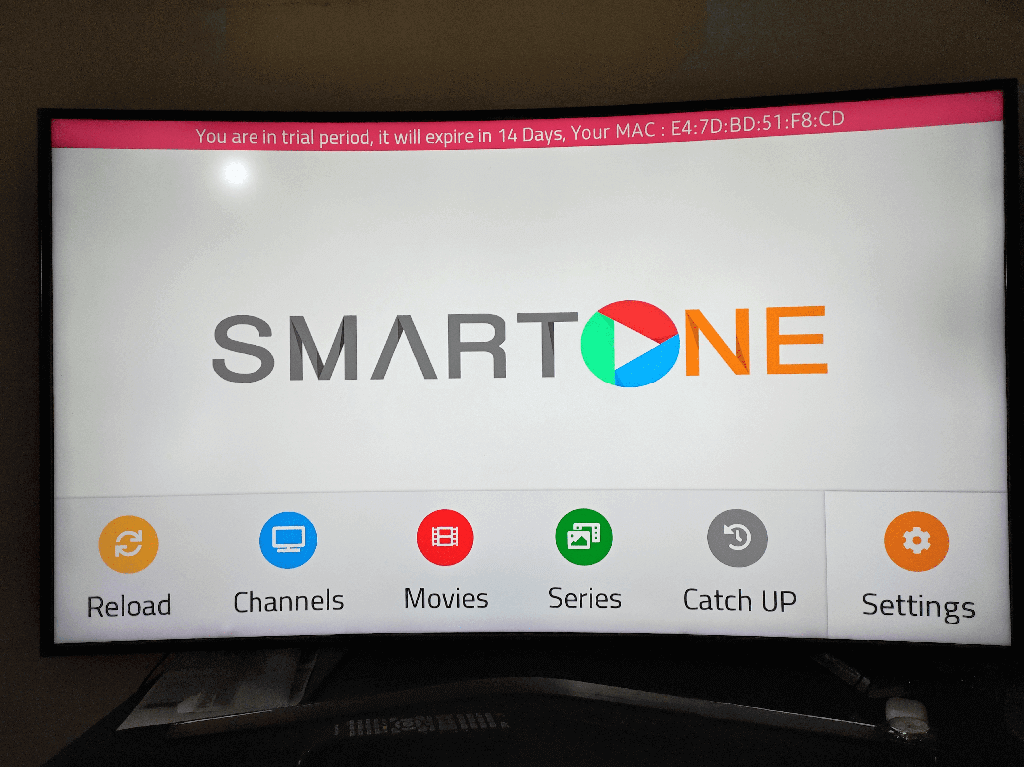
Step 2: Launch the app and write down the MAC address
Once the app starts, you will see at the bottom of the screen a series of 6 pairs of letters and numbers. For example:00:1A:2B:3C:4D:5E
This is your unique MAC address (Media Access Control address). This is all we need.
Step 3: Share the MAC address with Pro-IPTV
Send this MAC address to us via Joinchat, email or the contact form pro-iptv.eu.
Step 4: We’ll take care of the rest – completely free of charge
As soon as we see your MAC address:
- We activate your SmartOne app remotely.
- We connect a professional IPTV portal with thousands of channels, films and series.
- We pay for it out of our own pocket €12.50 for the Premium version from SmartOne.
- You restart the app and all channels are listed directly.
No M3U links. No USB sticks. No websites where you have to upload anything.
🎯 “We at Pro-IPTV see your MAC address – then we will arrange everything, free of charge”
This is our unique process and why we continue where others stop:
🔹 Step A: You start the SmartOne app.
🔹 Step B: You see a MAC address. We see that you have started the app.
🔹 Step C: You share the address with us (or we recognize your TV if you are already a customer).
🔹 Step D: We arrange everything. Activation, playlist, EPG, and payment of the app.
We do not charge a cent for this service. You will only pay for it if you later opt for an IPTV subscription. The app costs of €12.50? We take care of that.
💡 This is REALLY 100% service. No hidden fees, no “service fees”, no bribes.
💰 Decision: Do business with us and we will pay for the app (€12.50) for free
We understand that you may have doubts. There are so many IPTV providers. But ask yourself:
- How many providers pay the licensing costs of your app?
- How many providers solve problems remotely without you having to do anything?
- How many providers really continue when others have already stopped?
Answer: Only Pro-IPTV.
What do you get when you work with us?
✅ SmartOne Premium (normally €12.50) – free paid by us.
✅ Professional IPTV service with 20,000+ channels, VOD, series and EPG.
✅ REALLY 100% support – no chatbots, no automation, but real people.
✅ Remote installation via only your MAC address.
✅ We continue where others stop – we are ready for any problem.
What do you NOT have to do?
❌ No searching for M3U links.
❌ No payment to SmartOne.
❌ No technical knowledge.
❌ No hassle with uploading.
Are you ready for the best IPTV experience without the hassle?
📩 Send your MAC address now (that you are in the SmartOne app see) to our Joinchat.We activate within 10 minutes. You’re watching tonight. And we pay €12.50 for the app – from our gift.
Pro-IPTV – We continue where others stop. REALLY 100%.
Also read
Everything at a glance: Activating SmartOne: step-by-step plan and costs (2026) · What will SmartOne IPTV cost in 2026? · SmartOne vs Smart IPTV
Which IPTV app suits your device?
SmartOne is mainly intended for Samsung and LG. For Android TV and Firestick IPTV Smarters Pro and TiviMate often make more sense. View the comparison of the best IPTV apps or read the comparison between SmartOne and Smart IPTV.

Recent Comments