

SmartOne IPTV Netherlands – The Complete Guide (2026)
Are you looking for the best IPTV app for your Samsung or LG Smart TV? Then SmartOne is the right choice for you. No hassle with complicated M3U links, no hours of searching on forums. Just install, provide the MAC address, and watch.
In this complete guide, you’ll learn everything you need to know: how to install SmartOne, how the MAC address works, what it costs, and why Pro-IPTV is the best choice for Dutch users.
📱 Questions? Send us a WhatsApp – we help you for free
What is SmartOne IPTV?
SmartOne is a media player for Smart TVs, specifically developed for Samsung (Tizen) and LG (webOS) . It is the successor to the trusted Smart IPTV (SIPTV) app, but faster, more modern, and more stable.
The unique feature of SmartOne is that you don’t need an M3U link. Instead of those long, error-prone strings of letters and numbers, you work with a MAC address – a short code that your TV displays. You provide that address to your IPTV provider, and they handle the rest.
So: You install the app, you read the MAC address, you send it to us. That’s it. No searching, no typing errors, no frustration.
Why SmartOne is the Best Choice for Samsung and LG
There are many IPTV apps. Some are ugly, others are slow, and some are only available in Chinese in the app store. SmartOne is different.
| Feature | What it means for you |
|---|---|
| No M3U link | You never have to copy or paste long links again |
| Works with MAC address | You read a short code – done |
| Cloud playlist | Your channels remain saved, even after a TV update |
| EPG support | Just a program guide as you’re used to |
| Modern design | Sleek interface, works smoothly with your remote |
| Officially in the stores | No messing around with APK files or unknown sources |
And the best part? SmartOne is specially made for Samsung and LG. No fiddling with settings. It just works.
How to Install SmartOne on Your Samsung or LG TV
You don’t need technical knowledge. You can do this in a few minutes.
Step 1: Install the App
Samsung TV:
- Press the Home button on your remote
- Go to Apps (or Smart Hub)
- Search for “SmartOne”
- Click Install
LG TV:
- Press the Home button
- Go to LG Content Store
- Search for “SmartOne”
- Click Install
Takes a minute. You can do it yourself.
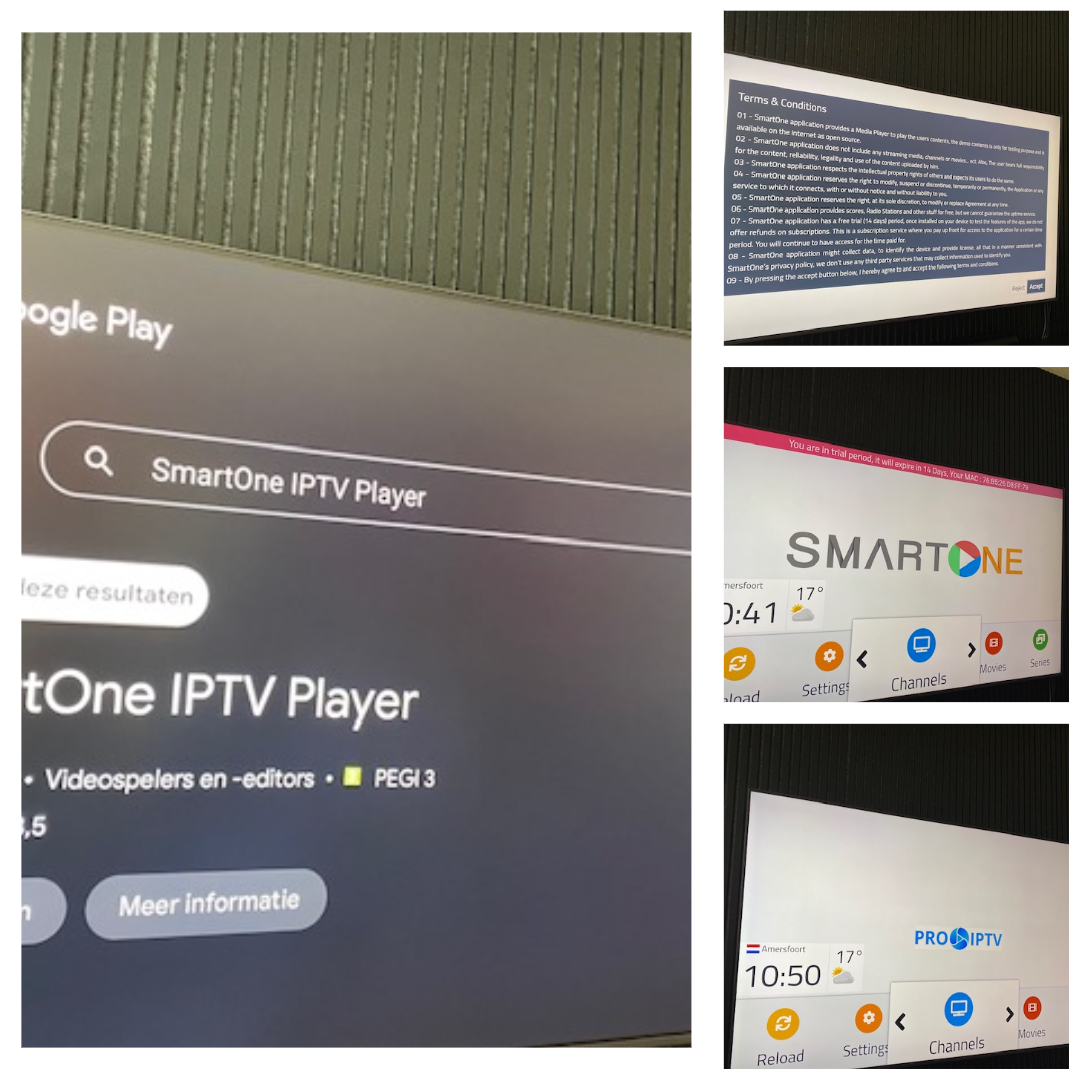
Step 2: Open the App and Note Your MAC Address
You open the app. What you see is a blank screen. At the bottom, there’s a series of six blocks with numbers and letters.
Example: 00:1A:2B:3C:4D:5E
That’s your MAC address. The unique number of your TV. Write it down, take a photo, or remember it – it’s only twelve characters.
Step 3: Send Your MAC Address to Pro-IPTV
You send us a WhatsApp message with just that address:
*”Hello, my MAC address is 00:1A:2B:3C:4D:5E.”*
That’s it. No upfront payment, no complicated forms.
Step 4: We Activate Everything
We link your MAC address to our system. We load all the channels for you. Within a few minutes, you’ll get a notification from us: “Restart the app.”
Step 5: Done!
You restart the app. All channels are there. Dutch channels, all sports (F1, Eredivisie, Champions League), movies, series – everything.
Time you spent: 3 minutes.
Number of M3U links you’ve seen: zero.
What Does SmartOne IPTV Cost at Pro-IPTV?
SmartOne itself is an app. But you also need an IPTV service that provides the channels. At Pro-IPTV, you get both.
| Duration | Price | What do you get? |
|---|---|---|
| 1 month | €10 | Everything. IPTV, sports, streaming. No contract. |
| 3 months | €25 | The same, but cheaper. |
| 6 months | €45 | Even cheaper. |
| 12 months | €75 | The best price. |
What’s included?
- All Dutch channels (NPO, RTL, SBS, regional)
- All sports (ESPN, Ziggo Sport, Viaplay, F1, Eredivisie)
- All streaming (Netflix, Videoland, Apple TV, Disney+, HBO Max)
- SmartOne Premium (no ads – we pay for the app for you)
- Remote installation via your MAC address
- Dutch WhatsApp support
In short: You pay less than half of a Ziggo subscription, and you get much more.
Why Choose Pro-IPTV? (And Not Directly via SmartOne?)
SmartOne is just a player. You still need someone to provide the channels. And that’s where we come in.
| Other Providers | Pro-IPTV |
|---|---|
| Send an M3U link – good luck with that | You send your MAC address – we do the rest |
| No installation help | Remote installation, within 10 minutes |
| No Dutch support | WhatsApp in Dutch, real people |
| No free trial | Always test for free first, then pay |
| Stop if it doesn’t work | We keep going where others stop |
And most importantly: We pay for the Premium version of SmartOne for you. You get no ads, without paying extra.
Want to Test for Free First? Always.
You don’t have to pay anything until you know it works. We simply give you a free trial period of 24 to 48 hours.
What you do:
- You send us a WhatsApp: “I want a free trial for SmartOne IPTV”
- We give you access (via your MAC address)
- You watch for a day or two – test all channels, sports, movies
- Like it? You pay and we continue your subscription.
- Don’t like it? You pay nothing. No risk, no hassle.
📱 WhatsApp now for your free trial: [insert your number here]
Frequently Asked Questions About SmartOne IPTV
Does SmartOne Work on Every Samsung TV?
SmartOne works on Samsung TVs with Tizen operating system, usually from 2016 or newer. Check in your TV settings under ‘About this device’ if you have Tizen.
Does SmartOne Work on Every LG TV?
Yes, on LG TVs with webOS from 2016 or newer. Same: check your settings.
What if My TV is Too Old?
No problem. You buy a Fire TV Stick (€30-50 at bol.com), connect it to your HDMI port, and use IPTV Smarters Pro on it. Works perfectly too.
Do I Need to Add an M3U Link Myself?
No. That’s the whole point. You provide your MAC address, we handle the rest. No M3U links, ever.
Is SmartOne Legal?
Yes. SmartOne is just an app from the official Samsung and LG app stores. It’s a media player. The content we provide is what you pay for.
What Does SmartOne Itself Cost?
The app normally costs €12.50 one-time for the Premium version (without ads). We pay that for you. You get the Premium version as a gift.
How Long Does the Installation Take?
You spend 3 minutes (installing the app, noting the MAC address, sending WhatsApp). We spend 5-10 minutes activating. Total: about 15 minutes and you’re watching.
Can I Watch on Multiple TVs?
Yes. You need a separate MAC address for each TV. Just send us the addresses of all your TVs. We activate them all.
Ready to Get Started?
You now know everything you need to know about SmartOne IPTV. It’s simple, it works on Samsung and LG, and you’re ready in 15 minutes.
📱 WhatsApp us with your MAC address – we’ll activate within 10 minutes.
Or request a free trial first. No risk, no upfront payment.
This is what you send:
“Hello, I want a free trial for SmartOne IPTV. My MAC address is [your address].”
We do the rest.
📱 WhatsApp: [insert your number here]
🌐 Website: pro-iptv.eu
Find the latest news here.
Watch IPTV in your city here
Pro-IPTV – REALLY 100% service. We go where others stop.