

Wesopro IPTV
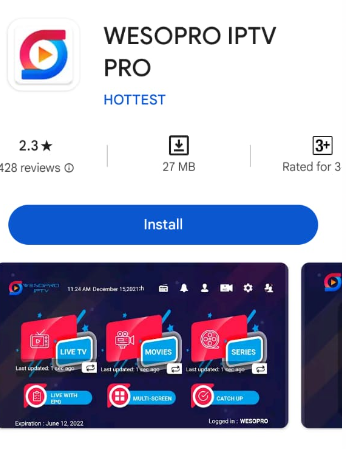
Wesopro IPTV – Installation Guide for Android, Fire TV, and Smart TV
Are you looking for a lightweight, user-friendly IPTV player for all your devices? Then Wesopro IPTV is an excellent choice. In this blog, I’ll explain what this app can do, how to install it, and why it works perfectly with Pro-IPTV.
📱 WhatsApp us for support and a free trial
What is Wesopro IPTV?
Wesopro IPTV is a modern media player designed specifically to play IPTV streams on various devices. Unlike SmartOne IPTV (which is exclusive to Samsung and LG), Wesopro IPTV works on almost any device:
- 📱 Android (phones and tablets)
- 🔥 Fire TV Stick (via sideloading)
- 📺 Smart TVs (with Android TV)
- 💻 PC (via emulator)
The great strength of Wesopro IPTV is that it supports the MAC address method, just like SmartOne does. This is the main difference from apps like Xtream Player or Smarters Pro: no hassle with M3U links. You simply provide your MAC address to your IPTV provider, and they handle the rest.
What the app is NOT: Wesopro IPTV does not include channels itself. It is only a player. You need a separate IPTV service (like Pro-IPTV) that provides the content.
Wesopro IPTV vs SmartOne – What’s the difference?
Both apps support the simple MAC address method. But there are differences.
| Feature | Wesopro IPTV | SmartOne IPTV |
|---|---|---|
| Works on | Android, Fire TV Stick, Nvidia Shield | Only Samsung and LG Smart TV |
| Installation | Play Store or sideloading | Smart Hub / LG Content Store |
| MAC address method? | ✅ Yes – super simple | ✅ Yes – super simple |
| Price | €9.99 one-time or €4.99/year | Premium (we pay for it for you) |
| EPG | ✅ Yes | ✅ Yes |
| Chromecast | ✅ Yes | ❌ No |
| Multilingual | ✅ Dutch available | ❌ Only English |
My advice:
- Do you have a Samsung or LG Smart TV? Then choose SmartOne – we pay for the premium version for you, so no extra costs.
- Do you have an Android phone, Fire TV Stick, or Nvidia Shield? Then Wesopro IPTV is an excellent choice, especially since it uses the same MAC address method.
Want to know how SmartOne works on your Smart TV? Then read our complete SmartOne guide.
Why Wesopro IPTV? (The benefits at a glance)
Wesopro IPTV has several unique advantages over other IPTV players.
1. No M3U links (works with MAC address)
This is the biggest advantage. Just like with SmartOne, you work with a MAC address instead of a long, error-prone M3U link.
- You install the app
- You read your MAC address
- You send it to your IPTV provider
- They handle the rest – you can watch within 10 minutes
No searching for links. No typos causing crashes. Just works.
2. Works on almost any device
Wesopro IPTV is available for:
- Android (Google Play Store)
- Fire TV Stick (via sideloading)
- Nvidia Shield
- Android TV
- Windows PC (via emulator)
For Samsung and LG, we recommend SmartOne – it works even smoother on those devices. But for the rest, Wesopro is a top choice.
3. Dutch in the interface
Many IPTV apps are only in English. Wesopro IPTV also supports Dutch as an interface language. This makes setup much easier for people who are not so tech-savvy.
4. Affordable price (or free?)
The app has a price tag: about €9.99 one-time or €4.99 per year. That’s not expensive for an app that works so well. But honestly: SmartOne is free for our customers – we pay for that app for you. So if you have a Samsung or LG, you’re better off with SmartOne.
5. Excellent EPG (program guide)
Wesopro IPTV has a clear program guide that loads quickly. You can see exactly what’s on TV now and what’s coming up. This works much better than some free alternatives.
How to install Wesopro IPTV?
On Android (Google Play Store)
- Open the Google Play Store on your phone, tablet, or Android TV
- Search for “Wesopro IPTV”
- Click Install
- Done!
On Fire TV Stick (sideloading)
Since the Fire TV Stick is not standard Android, you may need to sideload the app:
- Install the Downloader app from the Amazon Appstore
- Go to the official Wesopro website for the APK link
- Download the
.apkfile - Follow the on-screen installation instructions
💡 Tip: At Pro-IPTV, we can help you with the installation on Fire TV Stick. Just send a WhatsApp!
On Samsung or LG Smart TV?
Wesopro does not work directly on Samsung or LG. These TVs use Tizen (Samsung) and webOS (LG) – not Android. For these TVs, I recommend SmartOne. It works via the Smart Hub / LG Content Store and also uses the MAC address method.
SmartOne installs in a few clicks – super simple.
How to set up Wesopro IPTV? (With Pro-IPTV)
This is the beauty. Since both Wesopro IPTV and SmartOne support the MAC address method, you can use exactly the same details.
What you need:
- An active Pro-IPTV account (or a free trial – you can simply request one)
- Your MAC address (found in the Wesopro app)
- A Portal URL (provided by us)
Step-by-step plan:
- Open Wesopro IPTV
- Select “Login with MAC-address”
- You will see your MAC address in the app (starts with
00:1A:2B...) - Send that address to us via WhatsApp
- We link your MAC address to our service
- You will receive a Portal URL from us
- Enter that URL in the app
- Done! You can start watching immediately.
Time you spend: 3 minutes. Number of M3U links you have seen: none.
📱 WhatsApp us your MAC address – we’ll activate it within 10 minutes
Wesopro IPTV vs alternatives (which to choose? On which device?)
| App | Best for | Works with MAC? | Price | Pro-IPTV ready? |
|---|---|---|---|---|
| Wesopro IPTV | Android / Fire TV / PC | ✅ Yes | €4.99/year | ✅ Yes |
| SmartOne | Samsung / LG Smart TV | ✅ Yes | Free (we pay) | ✅ Yes |
| Xtream Player | Android / Fire TV | ❌ Only M3U | “Free” (annoying ads) | ✅ Yes |
| Smarters Pro | All devices | ❌ Only Xtream Codes | Free | ✅ Yes |
My advice per device: Definitely not this one
| Your device | Choose this | Why? |
|---|---|---|
| Samsung Smart TV | SmartOne | Free for Pro-IPTV customers, works via MAC address |
| LG Smart TV | SmartOne | Same story |
| Fire TV Stick | Wesopro IPTV | MAC address method, works smoothly |
| Android phone | Wesopro IPTV | Lightweight, Dutch available |
| Nvidia Shield | Wesopro IPTV | Best experience on this device |
Note: If you have a SmartOne account (via Pro-IPTV), you can also use Wesopro IPTV on your phone or Fire TV with the same MAC address. So you don’t pay twice.
Why Pro-IPTV + Wesopro IPTV is the perfect combination
Wesopro IPTV is a great app, but it does nothing without an IPTV service. That’s where Pro-IPTV comes in.
| Other IPTV providers | Pro-IPTV |
|---|---|
| Send an M3U link – good luck with that | You send your MAC address – we handle the rest |
| No installation help | Remote installation, within 10 minutes |
| No Dutch support | WhatsApp in Dutch, real people |
| No free trial | Always test for free first, then pay |
| No choice in apps | Works with SmartOne, Wesopro, Smarters, etc. |
And the best part: You pay once at Pro-IPTV, and you can watch on all your devices. Use SmartOne on your Samsung TV, Wesopro on your phone, and Smarters Pro on your Fire TV – all with the same details.
📱 WhatsApp us for a free trial – discover it yourself!
Frequently Asked Questions about Wesopro IPTV
Is Wesopro IPTV free?
No, not entirely. The app costs about €4.99 per year or a one-time €9.99. That’s not expensive for an app that works so well.
But: do you have a Samsung or LG TV? Then SmartOne is free for Pro-IPTV customers. We pay for that app for you.
Does Wesopro IPTV work on Samsung or LG?
No. Wesopro only works on Android devices (phones, tablets, Fire TV, Android TV). For Samsung and LG, you need SmartOne.
Does it work with the MAC address method?
Yes! That’s exactly why Wesopro is interesting. Just like SmartOne, you work with your MAC address, not with complicated M3U links.
Can I use Wesopro IPTV with Pro-IPTV?
Yes, definitely. You send us your MAC address (found in the Wesopro app) and we activate everything. Works just like with SmartOne.
Can I test for free first?
Yes. Always. Request a free trial via WhatsApp and test for yourself if Wesopro IPTV works well with our service. No risk, no upfront payment.
Does it work in all cities?
Absolutely. We are active throughout the Netherlands, from Amsterdam to Zwolle. Check our city page for the full overview.
📱 WhatsApp now for your free trial – we’ll help you with the installation!
Ready to start?
You now know everything about Wesopro IPTV. It’s an excellent, affordable IPTV player for Android users, with the MAC address method that makes it so easy.
Do you have a Samsung or LG Smart TV? Then use SmartOne – it’s free for Pro-IPTV customers and works even smoother on those TVs.
Do you have a Fire TV Stick or Android phone? Then Wesopro IPTV is a top choice. You use the same MAC address as with SmartOne, so you can easily switch between devices.
In both cases: you need an IPTV service. At Pro-IPTV, we arrange everything for you. You send your MAC address (or we help you with the installation), and within 10 minutes you can watch.
📱 WhatsApp us for a free trial – no risk, just watching!
Pro-IPTV – REALLY 100% service. We go where others stop. 💪

Recent Comments